
Table of Contents
Essential Tools for Software Development Consultants
As a software development consultant, juggling multiple client engagements demands a reliable and efficient toolkit. My approach to tooling is directly driven by the scope of each project and the client’s operational context, which is a crucial part of any effective digital transformation strategy. This selection process is never one-size-fits-all, and understanding how these tools interoperate often falls under the broader umbrella of enterprise architecture design.
Project Management & Collaboration
For my practice, Jira is a frequently used backbone for sprint planning and task tracking, especially for larger custom software builds. For engagements requiring a simpler visual workflow, Trello serves as an excellent lightweight alternative. My collaboration stack is almost always anchored by Slack for instant communication, supplemented by Confluence for creating living documentation that keeps everyone aligned on requirements.
Development and Deployment
Git, hosted on platforms like GitHub, is the absolute foundation of code collaboration and version control in my daily work. To ensure quality, I commonly automate testing and deployment pipelines using GitHub Actions. For containerized applications, Docker ensures consistency from a developer’s local machine right through to production deployment on cloud infrastructure.
Jira
Overview
As a software development consultant, I use Jira to manage complex projects. It’s a widely adopted Atlassian tool for Agile teams.
Features
Core features include sprint planning, issue tracking (bugs, tasks, user stories), custom workflows (Scrum, Kanban), and reporting dashboards.
Pricing
A free tier supports up to 10 users; paid Standard plans start at $7.75/user/month.
Pros/Cons
Jira’s flexibility, scalability, and robust reporting are strengths, though its steep learning curve and complexity can overwhelm small teams. For enterprise architecture design, custom workflows align well.
Best For
Jira suits custom software development projects needing flexible workflows and supports digital transformation strategy by centralizing Agile processes.
Confluence
Overview
Confluence is a web-based platform for centralised documentation, used by software development consultants, aligning with ISO standards.
Features
Key features include:
- Collaborative editing with real-time co-authoring
- Page tree hierarchy for organised content
- Templates for enterprise architecture design documentation
- Seamless integration with Jira for issue tracking
Pricing
Free for up to 10 users; paid plans from $5.75/user/month.
Pros/Cons
Confluence’s strengths include seamless Jira integration and an intuitive editing interface. However, search speed can decline in very large instances, which may impact productivity for documentation-heavy teams.
Best For
Ideal for a technology consulting services team driving digital transformation strategy, needing a single source of truth.
Slack
Overview
As a software development consultant, I use Slack as a real-time messaging hub. Relying on W3C web standards, it centralises team collaboration.
Features
Slack offers channels, direct messaging, file sharing, and integrations. For custom web development and seo workflows, it connects tools seamlessly. It supports any digital transformation strategy through automated notifications.
Pricing
Free tier available. Pro plan costs $7.25 per user monthly.
Pros/Cons
- Pros: extensive app ecosystem with very reliable notifications across all devices
- Cons: can become distracting with frequent interruptions; message history remains limited on the free plan
Best For
Slack suits teams needing instant communication and cross-tool integration. It bridges enterprise architecture design workflows effectively.
Notion
Overview
As a software development consultant, I use Notion as an all-in-one workspace for notes, databases and project management.
Features
Notion features a rich-text editor, relational databases, kanban boards, calendar views, wikis and an API. These tools support my seo services and consulting and digital transformation strategy.
Pricing
Free plan available; Team plan is $10/user/month; enterprise options also exist.
Pros/Cons
It is highly customisable and great for documentation, but offline mode is limited and large databases slow performance. Notion’s accessibility follows WebAIM standards yet has improvement areas.
Best For
Best for teams that need flexible note-taking, task tracking and databases; ideal for enterprise architecture design.
GitHub
Overview
As a software development consultant’s tool, GitHub is a Git-based collaboration platform. Host code, manage projects, and automate workflows with a large community.
Features
- Repositories for code storage and version control
- Pull requests with inline code review
- Issue tracking for project management
- GitHub Actions for CI/CD and digital transformation strategy
- Collaborative documentation for enterprise architecture design
Pricing
Public repositories are free; the Team plan costs $4 per user per month.
Pros/Cons
Pros: Large developer community and built-in CI/CD. Cons: Free tier restricts private repositories.
Best For
GitHub is best for developers and teams using Git and open-source collaboration. Open-source maintainers can consider digital public relations services, though results may vary based on project scope, competition, and ongoing optimisation. For an alternative, the next section covers other tools.
GitLab
Overview
GitLab is a web-based DevOps platform integrating Git repository management with CI/CD, container registry, issue tracking, and security scanning.
Features
Key features include built-in CI/CD, container registry, issue tracking, and security scanning. I use these to accelerate Custom-Built Solutions, supporting digital transformation strategy and enterprise architecture design.
Pricing
GitLab offers a free tier; the Premium plan costs $19/user/month.
Pros/Cons
The self-hosted option gives full control, and strong CI/CD supports automated workflows. Some users note the interface can feel slower than GitHub’s, which may impact enterprise teams.
Best For
I recommend GitLab for custom software projects requiring self-hosting and integrated DevOps. For web applications, I pair it with web design and hosting services.
AWS
AWS (Amazon Web Services) is the world’s leading cloud platform, offering a comprehensive suite of infrastructure services that power modern digital transformation strategy. As a software development consultant, I often recommend AWS for businesses that need scalable, secure cloud infrastructure to host custom web applications and support enterprise architecture design.
Overview
The platform provides on-demand access to computing power, storage, and advanced technologies without the overhead of physical hardware.
Features
Core service categories include elastic compute, object and block storage, managed databases, machine learning tools, and identity-based security controls.
Pricing
AWS follows a pay-as-you-go model, and new users can explore many services through a 12-month free tier with defined usage limits.
Pros/Cons
The unmatched breadth of services and global data centre footprint make AWS ideal for enterprise-grade deployments. However, the pricing structure can become complex, and the learning curve is steep for teams new to cloud architecture.
Best For
AWS excels when you need scalable cloud infrastructure for custom software, data-intensive workloads, or hosting SEO-optimised websites with performance at their core.
From custom web applications to fully managed hosting environments, I integrate AWS where it delivers practical value for your project. Results may vary based on project scope, competition, and ongoing optimisation. No guaranteed search rankings; past performance does not guarantee similar results. Consult a professional for tailored advice and a project quote.
Google Cloud
Having examined another leading platform, I now turn to Google Cloud — a platform where, as a software development consultant, I frequently guide clients through its data‑rich capabilities and how they can accelerate a modern digital transformation strategy.
Overview
Google Cloud is Google’s suite of cloud computing services, built on the same infrastructure that powers Search and YouTube. It delivers infrastructure‑as‑a‑service, platform‑as‑a‑service, and serverless options through a global fibre network.
Features
Core services include Compute Engine for virtual machines, BigQuery for petabyte‑scale analytics, Google Kubernetes Engine for container orchestration, and a full stack of AI/ML tools from Vertex AI to pre‑trained APIs. These components integrate natively with Google Workspace and Android, simplifying the kind of cohesive enterprise architecture design that many businesses need.
Pricing
Google Cloud uses a pay‑as‑you‑go model with per‑second billing and automatic sustained‑use discounts. New users can explore the platform risk‑free through a free tier that includes a $300 credit. For customised cost scenarios, I recommend reaching out for a tailored quote — my custom‑built solutions ensure you only provision what your application truly requires.
Pros/Cons
- Strengths: industry‑leading data analytics, seamless integration with Google services, and advanced machine learning capabilities.
- Limitations: a smaller third‑party ecosystem and enterprise market share compared to AWS, though its innovation pace continues to close the gap.
Best For
Google Cloud excels for data‑heavy applications, real‑time analytics, and machine learning workloads. Organisations looking to Transform Your Digital Presence with AI‑infused products often find its managed services accelerate time‑to‑value.
Next, I compare Google Cloud with other providers to help you choose the best fit for your software development project — ensuring your investment aligns with both technical requirements and long‑term business goals.
Miro
Moving to Miro, another popular choice for real-time collaboration, I find this cloud-based whiteboard invaluable for mapping out complex ideas across an infinite canvas. It is particularly useful for visual thinkers tackling enterprise-level problems.
Overview
Miro is an online collaborative platform built around an infinite canvas that supports sticky notes, freeform drawing, and diagramming. I use it extensively to structure workshops where participants need a shared space to co-create in real time, regardless of their physical location.
Features
The core toolkit includes sticky notes for ideation, diagramming shapes for architecture mapping, and a massive template library for sprint retrospectives. Real-time collaboration lets distributed teams move cursors simultaneously, while integrations with tools like Jira keep technical workflows connected to a digital transformation strategy canvas.
Pricing
A free plan offers three editable boards with basic features. The Team plan costs roughly $10/user per month and unlocks unlimited boards plus advanced facilitation tools, though I always recommend checking Miro’s official site for current Australian pricing.
Pros/Cons
- Pros: intuitive interface, rich template gallery, excellent real-time synchronisation
- Cons: free tier limits editable boards; advanced diagramming and voting require paid plans
Best For
As a software development consultant, I depend on Miro for remote brainstorming, sprint retrospectives, and mapping out enterprise architecture design. It transforms abstract strategic conversations into tangible, shareable artefacts that drive alignment across technical and business stakeholders. From my six years of hands-on technical delivery, I have found it a reliable tool for visualising complex systems without overcomplicating the workflow. Now let’s look at another tool that excels in a slightly different collaboration style.
Figma
Overview
As a software development consultant, I rely on Figma, a cloud-based UI/UX design and prototyping tool, for efficient collaboration and workflows.
Features
Key features include vector editing, interactive prototyping, reusable component libraries, centralized design systems, real-time collaboration, and developer handoff. This supports my digital transformation strategy and enterprise architecture design work.
Pricing
Figma’s free tier covers up to 3 projects; Professional is $12/editor/month.
Pros/Cons
Pros: seamless real-time collaboration, cloud access, robust component libraries, efficient developer handoff. Cons: it requires constant internet, limited offline. These constraints are minor compared to the productivity gains.
Best For
Figma is best suited for UI/UX design and collaborative prototyping in agile teams. I integrate it into my digital transformation strategy work.
Comparison of Key Tools
As a software development consultant, I guide clients through technology choices that directly impact project outcomes. The following matrix distills how five essential platforms map to the core activities of a modern consulting engagement.
| Feature | Jira | Confluence | Slack | Notion | AWS |
|---|---|---|---|---|---|
| Project Management | Advanced | Basic | None | Moderate | N/A |
| Documentation | Moderate | Excellent | Minimal | Excellent | N/A |
| Real-time Communication | Limited | Limited | Excellent | Moderate | N/A |
| Cloud Infrastructure | N/A | N/A | N/A | N/A | Excellent |
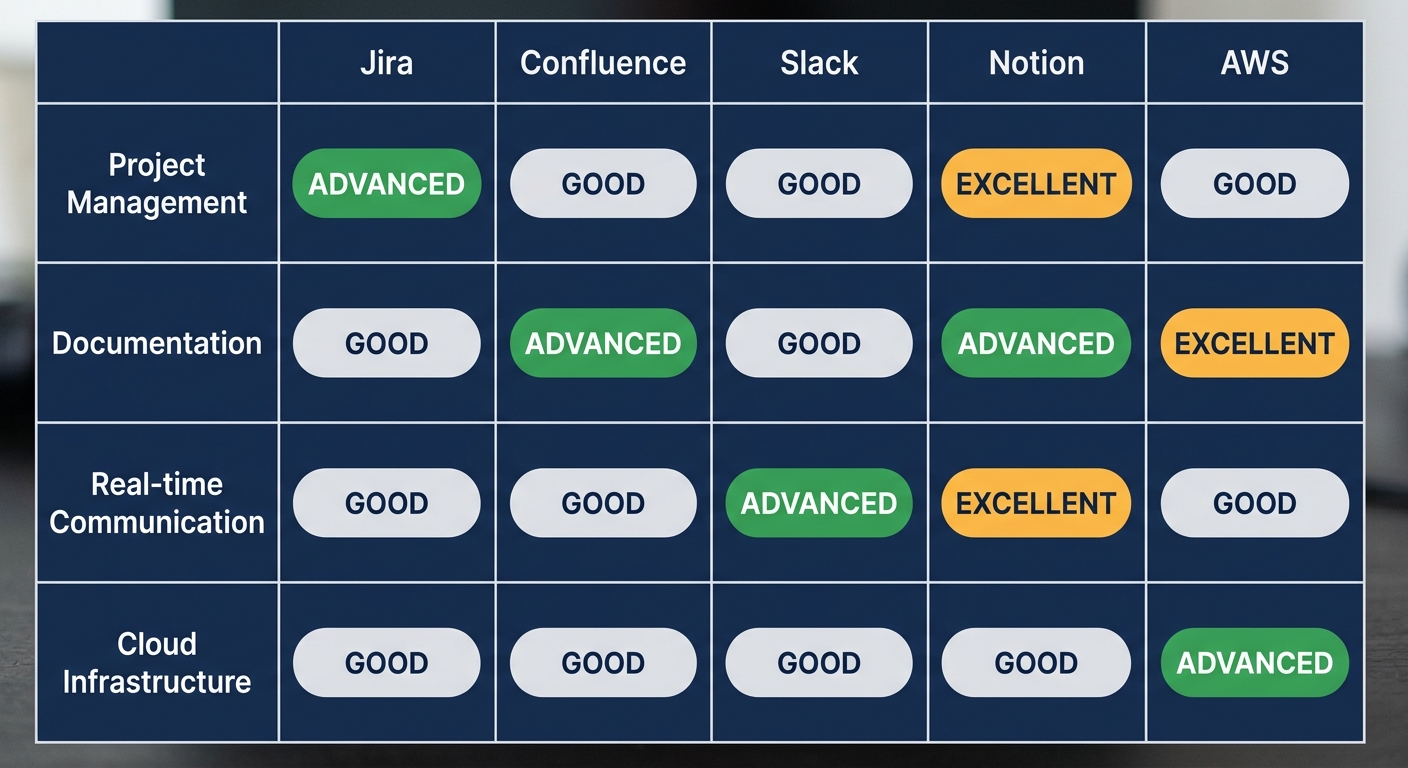
Comparison matrix of key software development tools for consulting projects.
These ratings reflect widespread industry perception rather than exhaustive testing. Jira excels at complex sprint management, Confluence and Notion each deliver excellent documentation workflows, and Slack anchors real-time coordination. AWS sits apart as the infrastructure layer that hosts the other tools and the solutions they help build–a consideration I fold into every enterprise architecture design engagement. The right mix depends on your team size, budget, and the integration demands of your digital transformation strategy. I encourage you to use this comparison as a starting point and reach out for a tailored recommendation.
Selecting the Right Tools for Your Consulting Practice
Once your practice is set up, the next step is selecting the right tools. As a software development consultant, I start every engagement with a structured needs audit.
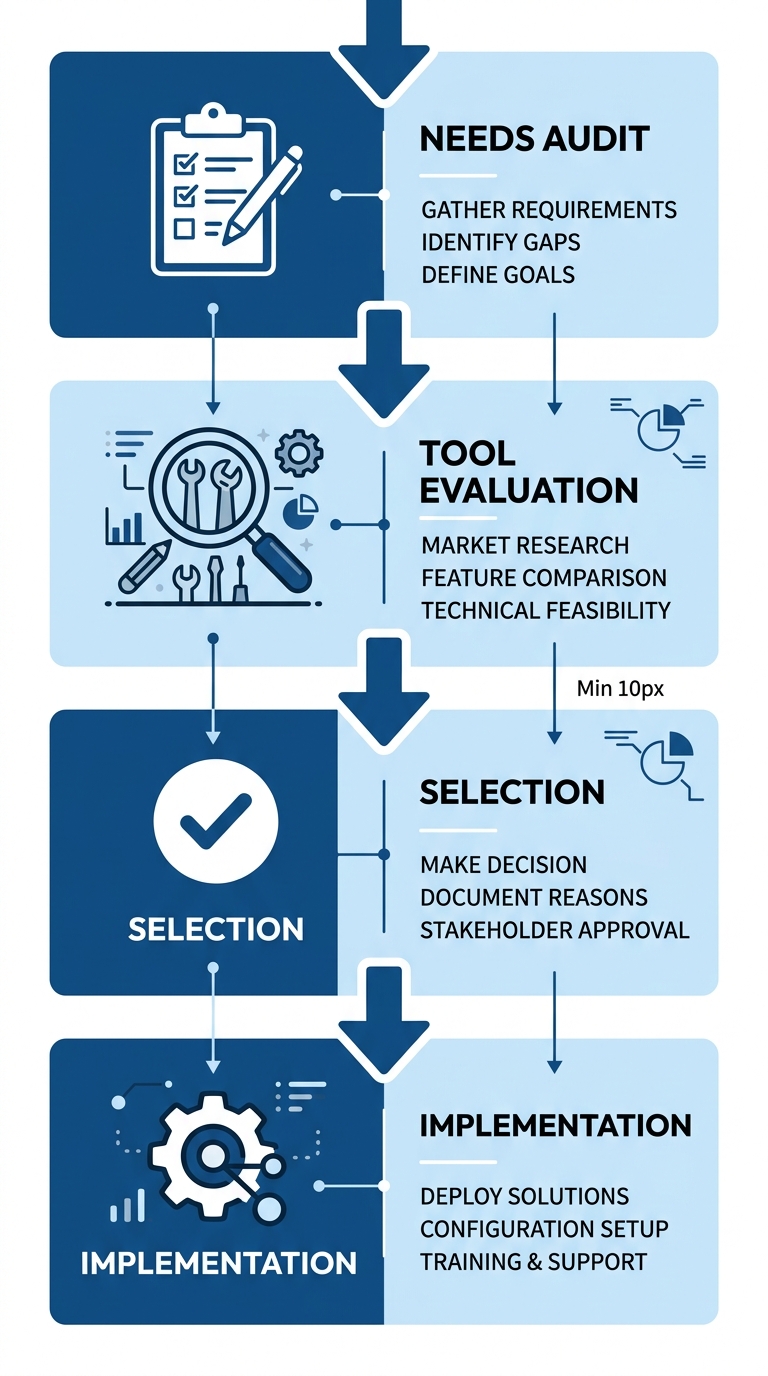
Four-stage tool selection process for consulting practice.
My recommended decision framework evaluates tools across three dimensions:
- Scope and scalability for custom web applications
- Integration needs to accelerate a digital transformation strategy
- Maintenance overhead for long-term enterprise architecture design
With the right tools in hand, you can now move into building your first client solution.